PS:只是对通过APP Icon的按压快速进入页面的使用说明,无其它干货!
在后台模式时通过3D Touch进入程序会执行application:performActionForShortcutItem:completionHandler方法,干掉进程后直接通过3D Touch不会执行上面的方法,而在程序启动方法application:didFinishLaunchWithOptions中执行,参考其它Demo时没发现这个问题,不知道是不是坑,先在此Mark一下.
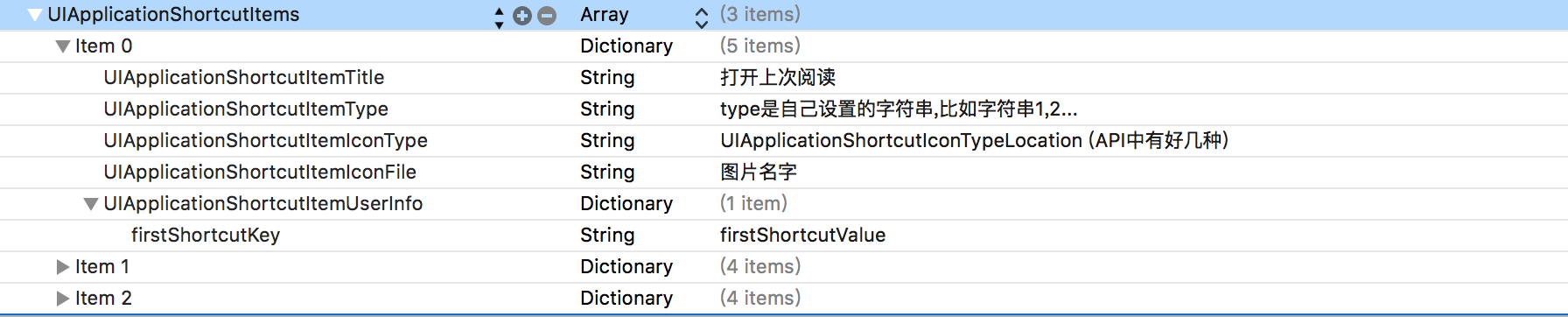
添加shortcutItem有静态和动态两种设置方法,以下是用code动态添加的,因为在plist文件中添加很痛苦,没代码来的快.最后附了点plist文件中的设置参数,有兴趣的可以瞧瞧.
废话到此结束,上代码
代码动态添加
- (BOOL)application:(UIApplication*)application didFinishLaunchingWithOptions:(NSDictionary*)launchOptions
{
    if (application.shortcutItems.count == 0) {
        [self configShortCutItems];
    }
    //通过点击3D T的shortcutItem进入时(非后台模式进入),此value不为nil
    UIApplicationShortcutItem *shortItem = launchOptions[UIApplicationLaunchOptionsShortcutItemKey];
    if (shortItem) {
        //我们项目里此处如果不延时调用的话,某些东西加载不出来
        dispatch_after(dispatch_time(DISPATCH_TIME_NOW, (int64_t)(0.25f * NSEC_PER_SEC)), dispatch_get_main_queue(), ^{
            [self handleShortcutItem:shortItem];
        });
        return NO;
    }
    return YES;
}

- (void)application:(UIApplication *)application performActionForShortcutItem:(UIApplicationShortcutItem *)shortcutItem completionHandler:(void (^)(BOOL))completionHandler
{
    [self handleShortcutItem:shortItem];
}

- (void)configShortCutItems
{
    if (SystemVersion() >= 9.0f) {
        UIMutableApplicationShortcutItem *item1 = [[UIMutableApplicationShortcutItem alloc] initWithType:@"1" localizedTitle:@"打开上次阅读" localizedSubtitle:nil icon:[UIApplicationShortcutIcon iconWithTemplateImageName:@"lastRead"] userInfo:nil];
        UIMutableApplicationShortcutItem *item2 = [[UIMutableApplicationShortcutItem alloc] initWithType:@"2" localizedTitle:@"重磅限免" localizedSubtitle:nil icon:[UIApplicationShortcutIcon iconWithTemplateImageName:@"limitedFree"] userInfo:nil];
        UIMutableApplicationShortcutItem *item3 = [[UIMutableApplicationShortcutItem alloc] initWithType:@"3" localizedTitle:@"签到" localizedSubtitle:nil icon:[UIApplicationShortcutIcon iconWithTemplateImageName:@"signIn"] userInfo:nil];
        [UIApplication sharedApplication].shortcutItems = @[item1, item2, item3];
    }
}

- (void)handleShortcutItem:(UIApplicationShortcutItem *)shortcutItem
{
    NSString *type = shortcutItem.type;
    switch (type.integerValue) {
        case 1: //打开上次阅读
        {
            //要进行的操作
            ...
        }
            break;
        case 2: //重磅限免
        {

        }
            break;
        case 3: //签到
        {

        }
            break;
    }
}
info.plist静态设置shortcutItem的方法
<key>UIApplicationShortcutItems</key>
    <array>
        <dict>
            <key>UIApplicationShortcutItemTitle</key>
            <string>标题(显示的标题)</string>
            <key>UIApplicationShortcutItemType</key>
            <string>type是自己设置的字符串,比如字符串1,2...</string>
            <key>UIApplicationShortcutItemIconType</key>
            <string>UIApplicationShortcutIconTypeLocation (API中有好几种)</string>
            <key>UIApplicationShortcutItemIconFile</key>
            <string>图片名字</string>
            <key>UIApplicationShortcutItemUserInfo</key>
            <dict>
                <key>firstShortcutKey</key>
                <string>firstShortcutValue</string>
            </dict>
        </dict>
    </array>
QQ20160114-0@2x.png

Icon尺寸:
- 35x35 (1x)
- 70x70 (2x)
- 105x105 (3x)
参考:
Adding 3D Touch Quick Actions
iOS9系列专题一3D Touch
3DTouchSample
